
Most teams spend far more time than they realise creating the same recurring reports every week or every month.
Sales numbers.
Project updates.
Financial summaries.
Marketing performance.
Client progress reports.
It’s the same ritual every time:
open three different systems → pull the data → update the spreadsheet → reformat the layout → export → email it to stakeholders.
It’s predictable, repetitive, and in most businesses, completely unavoidable.
But here’s the part no one questions:
Why are humans still doing something a workflow can do automatically?
The Hidden Cost of Manual Reporting
For most teams, recurring reports consume 10+ hours every month – hours spent on data entry instead of meaningful analysis.
Reporting becomes a chore, not a tool for decision-making.
And the more reports you maintain, the more time you lose.
But this problem is perfectly suited for automation.
The Workflow That Generates Reports Automatically
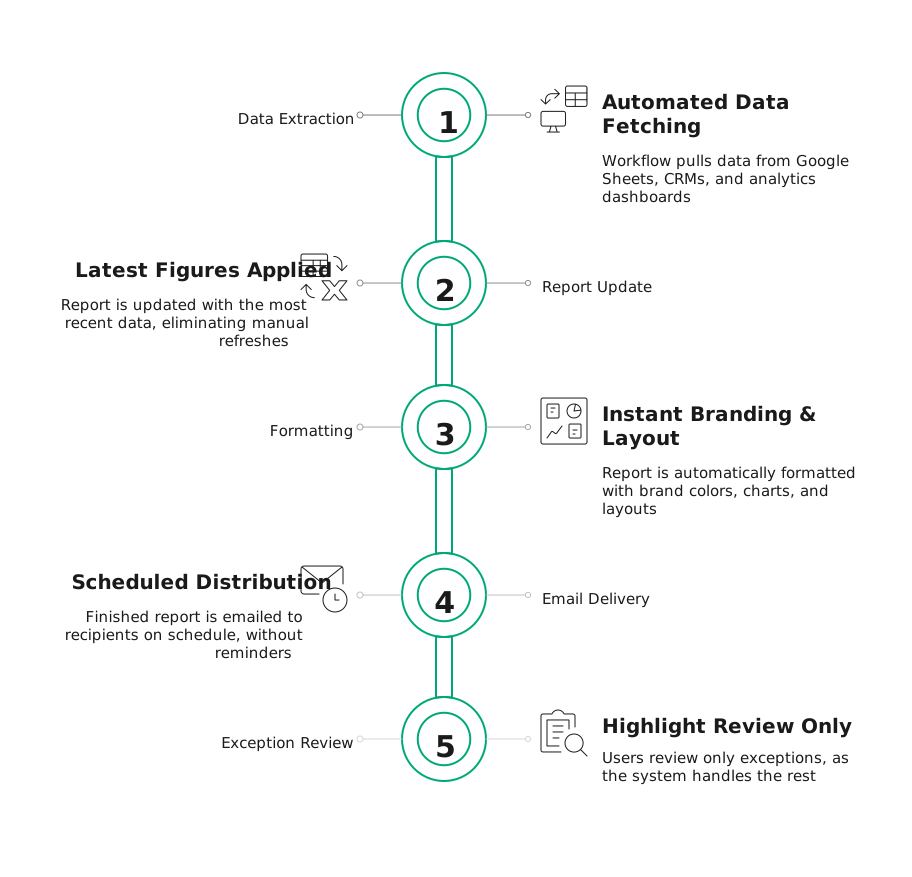
Modern reporting automation replaces manual copy-paste work with a clean, dependable system that updates reports for you.
Here’s what the Auto-Report Generator Workflow does behind the scenes:
- It pulls data automatically from your systems
Google Sheets, CRMs, analytics dashboards, wherever the numbers live, the workflow fetches them. - It updates the report with the latest figures
No more refreshing dashboards or downloading CSVs. - It applies your formatting instantly
Brand colors, charts, layouts, sections – all done consistently and automatically. - It emails the finished report to the right people
On schedule. Without reminders. Without follow-ups. - And you only review exceptions
Because the system handles the rest.
What used to take 30–60 minutes per report now takes 5 minutes or less – simply to review the highlights.
Why This Matters

One of our clients automated eight weekly reports using this exact workflow.
Before automation: 6 hours per week
After automation: 30 minutes reviewing highlights
That’s 5.5 hours saved every week
280+ hours every year
all from automating something no one ever questioned.
And unlike popular “DIY” automation tools that overwhelm teams with complex logic, connector limits, or expensive pricing tiers, this workflow is designed to be:
- simple
- predictable
- scalable
- built around your reporting needs
No tool-chasing. No learning curve. No unnecessary complexity.
A Calm Introduction to Smarter Reporting

Viewing this workflow isn’t about learning a new platform.
It’s simply about seeing what’s possible when reporting no longer depends on manual updates or rushed deadlines.
Start with one recurring report.
Watch it generate itself.
Then imagine a world where the rest of your reports update just as effortlessly, every week, every month, across your entire business.
Curious how ready your business is for automation?
See where automation can make the biggest impact for you