


Have you ever heard people buzzing about how important user experience is for website success? You’ve probably heard it a million times by now in today’s competitive digital world.
But guess what?
That amazing UI/UX design we all love isn’t just fantastic for your users – it’s also a total game-changer for your search engine rankings!
Think about it: websites that are a joy to use, with super easy navigation and eye-catching content, just naturally shine brighter, don’t they?
And here’s the truly exciting part: Search engines, especially Google, are totally paying attention to user experience as a ranking factor. They are constantly tweaking their algorithms to favour sites that offer an exceptional experience.
So, this isn’t just about making your website look pretty (though that’s a bonus!). It’s about implementing design principles that will genuinely supercharge your website’s SEO. Each principle might seem simple, but trust us, they are powerful tools in your arsenal. By putting these strategies into action, you’re not just building a stunning website; you’re building one that’s set to climb those search engine ranks, attracting more organic traffic and potential customers right to your virtual doorstep!
Let’s explore these incredible UI/UX design principles together!
Features of Good Web Design: 12 UI/UX Design Principles to Enhance Your Website's SEO Strategy
1. Responsive Design: Adapting to Every Screen
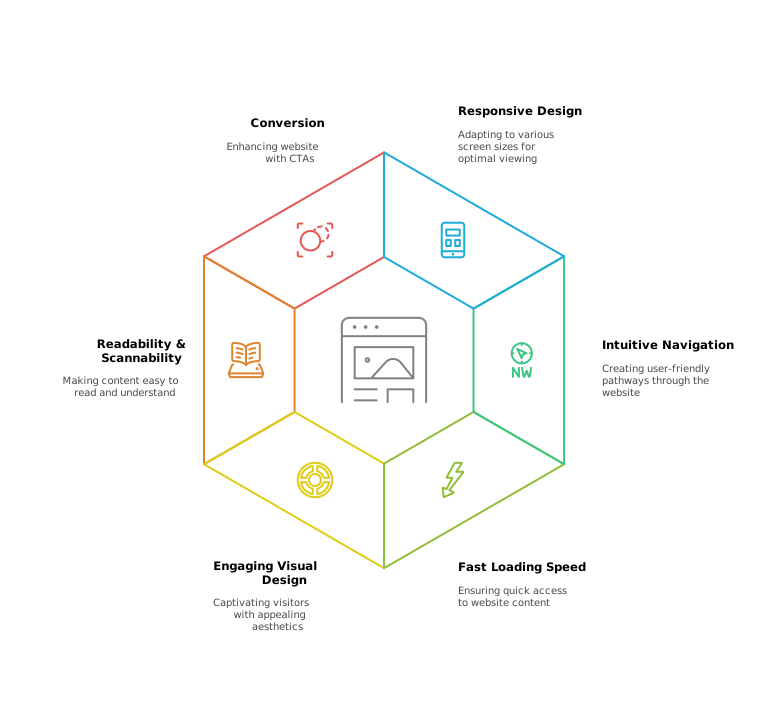
Responsive design ensures your site automatically adjusts to fit smartphones, tablets, laptops, and desktops. In a world where over half of all web traffic comes from mobile devices, this is non-negotiable.
A responsive layout:
- Eliminates horizontal scrolling and zooming
- Keeps navigation buttons and text legible
- Optimizes images to load appropriately for each screen size
By implementing these strategies, you’ll provide a seamless experience regardless of device and satisfy Google’s mobile-first indexing requirements.

2. Intuitive Navigation: Your Website’s Friendly Roadmap
Navigation acts like a GPS for your visitors—clear directions reduce frustration and encourage exploration.
Organize your menu with logical categories, and include:
- Hierarchical Menus: Dropdowns or sidebars that reveal subtopics
- Breadcrumb Trails: Show users their current path (e.g., Home > Services > Automation)
- Search Bars: Allow quick keyword searches for large sites
When users find what they need in two or three clicks, session durations increase and bounce rates drop. Search engines reward well-structured sites by crawling them more effectively, boosting your SEO.
3. Fast Loading Speed: Blink and You Won’t Miss It
Page speed directly impacts both user engagement and search rankings.
A one-second delay can lead to a 20% drop in conversions.
To optimize performance:
- Image Compression: Use modern formats like WebP and lazy loading
- Caching & Minification: Store static resources and reduce file sizes
- Content Delivery Network (CDN): Serve assets from servers nearest your users
Faster pages keep visitors on your site longer—lowering bounce rates and signaling quality to Google’s page experience algorithm.
4. Is Your Website Ready to Captivate and Convert?
Drive engagement and authority with expertly crafted, SEO-optimized content tailored for the modern B2B audience. From thought-leadership blog posts to persuasive whitepapers and case studies, tell your story and turn readers into customers.
5. Engaging Visual Design: Captivating Your Visitors
First impressions count.
A polished visual hierarchy—using size, color, and whitespace—guides attention to key calls to action.
Key considerations:
- Color Palette: Align with your brand and evoke the desired emotion
- Typography: Pair readable fonts with proper line spacing and contrast
- Multimedia: Strategically placed videos or graphics to support your message
When visitors are visually engaged, they explore more pages. Increased session depth is another positive ranking signal for search engines.
6. Readability & Scannability: Easy Does It
Most readers scan before they dive in.
Make your content digestible by:
- Short Paragraphs: 2–4 sentences with clear topic sentences
- Descriptive Subheadings: Break content into meaningful sections (use H3s for detail)
- Bullet Lists: Highlight key insights or steps
For example, a bulleted list of UX best practices can convey complex information at a glance. Enhanced scannability boosts time on page and empowers search engines to understand content structure.

Suggested reading:
CPM Full Form in Digital Marketing: What Is Cost-Per-Mille and How It Impacts Your Ad Strategy

7. Optimized Media: Speeding Up the Visuals
High-quality images and videos engage visitors but can slow your site if left unchecked.
Optimize media by:
- Compressing Files: Strike a balance between quality and size
- Adding Alt Text: Improve accessibility and give search engines context
- Responsive Media Players: Ensure video players adapt to any device
Optimized media loads faster, reduces bandwidth usage, and contributes to a smoother UX—factors that Google interprets as positive ranking signals.
8. SEO-Friendly URLs: Clear Paths for Everyone
Clean, descriptive URLs help both users and search engines.
Follow these guidelines:
- Keep It Simple: Avoid random IDs or parameters
- Use Hyphens: Separate words with hyphens (
/good-web-design-featuresnot_) - Include Keywords: Place the focus keyword near the beginning
Such URLs improve click-through rates in SERPs and reinforce page relevance for targeted queries.
9. Is Your Website Design Backed by User Research?
Uncover deep customer insights and optimize every touchpoint through qualitative and quantitative analysis. From usability testing and user interviews to persona development and journey mapping, our UX research services ensure your product resonates and converts.
10. Clear Call-to-Actions (CTAs): Guiding Users to Engage
CTAs drive conversions—be it form submissions, downloads, or contact requests.
Effective CTAs use:
- Contrasting Colors: Stand out against your background
- Action-Oriented Copy: “Download Your UX Checklist Now”
- Strategic Placement: Above the fold and at the end of sections
When users take action, engagement metrics rise. These behavioral indicators tell search engines your content is valuable.
11. Accessibility & Usability: Welcoming Everyone
An accessible site reaches a broader audience and demonstrates best practice.
Key measures include:
- WCAG Compliance: Follow guidelines for color contrast, alt text, and navigation
- Keyboard Navigation: Ensure all interactive elements are reachable via keyboard
- Semantic HTML: Use proper heading tags, lists, and landmarks
Accessible sites often see lower bounce rates and longer sessions—both beneficial for SEO.
12. Quality Content: The Heart of It All
All the design elements in the world can’t substitute for compelling content.
Your pages should:
- Meet User Intent: Address questions or needs directly
- Provide Value: Offer actionable insights, data, or solutions
- Incorporate Keywords Naturally: Sprinkle your focus keyword and synonyms organically
High-quality content attracts backlinks and social shares, amplifying your authority and boosting search rankings.
The Amazing Synergy of UX and SEO
By integrating these features of good web design, you create a seamless, user-centric environment that search engines love. From responsive layouts and intuitive navigation to optimized media and accessibility, each principle contributes to better engagement, lower bounce rates, and higher rankings. Implement these strategies to transform your site into a conversion engine—your users and your SEO performance will thank you.
Ready to elevate your web presence?
Apply these design fundamentals today and watch your organic traffic and engagement soar!
Leverage proven web design features that enhance user experience, boost search visibility, and drive higher conversions—seamlessly blending form and function for measurable results.