


Have you ever looked at your website and thought, “Could it do more? Could it be faster, more engaging, and truly ready for whatever the digital world throws at it?”
If so, you’re in the right place!
In today’s super-fast digital landscape, your website isn’t just a static online brochure; it’s your 24/7 salesperson, your brand’s first impression, and a powerful conversion machine. But here’s the thing: designing a high-performing WordPress website that can genuinely grow with your business?
That’s a whole different ballgame.
With thousands of agencies out there and countless DIY tips, it can feel like you’re searching for a needle in a haystack when it comes to optimising your site for growth and efficiency. That’s why we’re here to cut through the noise and give you the ultimate guide to custom WordPress design, expert development, and strategic redesigns that deliver real results. Let’s make your website truly shine!
Why Scalability Matters for Your Business – It’s a Game-Changer!
Imagine your website suddenly goes viral? One day suddenly you get 500% more visitors than you are used to getting. Sounds amazing, right?
But what if it crashes under the weight of all that excitement?
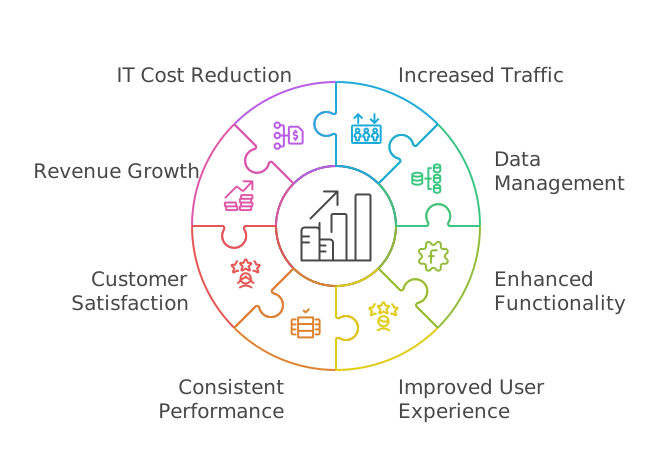
That’s where scalability swoops in as your business’s superhero. Scalability refers to your website’s ability to handle growth effectively, whether that’s increased traffic, larger amounts of data, enhanced functionality, or an improved user experience.
Incorporating scalable web hosting can dramatically impact your business success, preventing downtime and improving user experience. Without it, you could be punished for your website’s success! If your site isn’t scalable and suddenly gets a traffic surge, it could become unavailable, turning your moment of fame into a reputation hit. Scalability ensures consistent performance, even during major sales events, product launches, or viral content spikes. It also enhances customer satisfaction and loyalty, drives revenue growth, and even reduces IT costs by allowing resources to be reallocated.
Sounds pretty essential, doesn’t it?
Spotting the Signs: Do You Have Scalability Issues?
Sometimes, you might not even realise you’re facing scalability issues, which can seriously hold your site back. Once you know what to look for, you’ll be empowered to make the right changes!
Here are some tell-tale signs that your website might be struggling with scalability:
- Your site is running sluggishly or slower than usual.
- You’re about to deliberately grow your marketing efforts. Planning a big campaign? Your site needs to be ready!
- Your website consistently gets high traffic. Congratulations on the traffic, but is your hosting keeping up?
- You’re experiencing increasing security concerns. As your business grows, so do the risks; scalability issues can manifest as difficulty maintaining robust security.
Many of these issues are technical but can often be resolved by upgrading to a managed hosting plan instead of relying on tricky DIY fixes.
Common Culprits for Performance Issues
- Too much “bloat” from autoloaded options, especially from old plugins
- Running out of storage
- Slow queries from unoptimized custom post types
- Managing too many logged-in users
- Inefficient transients and object cache overload
- Poor database structure and heavy WordPress hooks
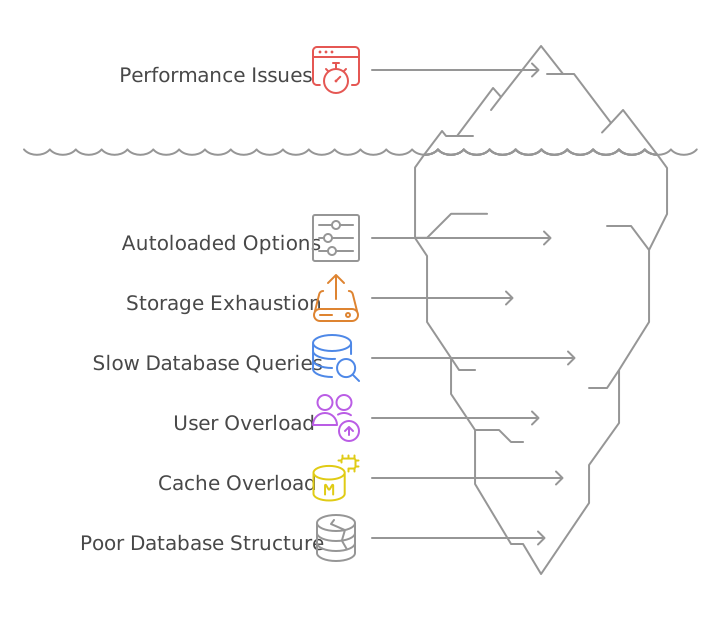
These are all things that a robust, scalable approach can tackle head-on!

Suggested reading:
Creative Digital Marketing Ideas to Boost Conversion Rates and Business Growth
Custom WordPress Design: Your Ticket to Standing Out and Soaring High!
Now, let’s talk about truly making your website yours.
Your business deserves more than a generic template. While pre-built themes might seem like a quick fix, they often look generic, are bloated with unnecessary features, and limit flexibility.
You don’t want your competitors using the exact same theme, do you?
And slower load times mean lost conversions – a 1-second delay can drop conversions by 7%!
This is where custom WordPress design proves invaluable. A custom-designed site focuses squarely on your brand, objectives, and target audience, resulting in a website that doesn’t just exist – it performs!
With a custom WordPress design, you get these fantastic benefits:
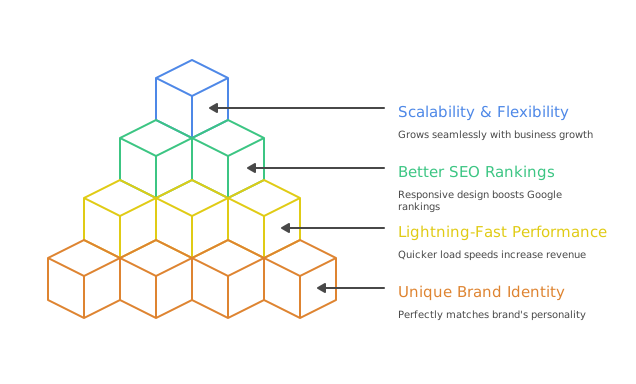
A Unique Brand Identity
Say goodbye to blending in! Your site will perfectly match your brand’s personality.
Lightning-Fast Performance
A clean, optimised design means quicker load speeds, which is crucial as even a 100-millisecond improvement can significantly increase revenue.
Better SEO Rankings
Custom sites are built with responsive design and SEO best practices in mind, helping you climb those Google rankings. More traffic, more leads, more sales – who doesn’t love that?!
Scalability & Flexibility
As your business grows, your site grows seamlessly with it, without design restrictions or unnecessary headaches.
Think of giants like Amazon or TechCrunch – their websites aren’t off-the-shelf templates. They’re custom-built for speed, usability, and conversions, handling millions of visitors daily without a hitch.
That’s the power of custom design!
Is Your Website Ready to Dominate Search Rankings?
Leverage strategic keyword research, SEO‑optimized copywriting, and compelling content frameworks to attract qualified traffic and convert visitors into leads. From comprehensive topic ideation and meta‑tag optimization to engaging blog posts, white papers, and landing‑page copy, ensure every word works toward higher visibility and measurable growth.
Why Choose a Specialized WordPress Web Design Company?
Your website is far too important to trust to just anyone.
Would you hire a handyman to build your dream home?
Probably not, right? You’d want an expert!
The same goes for your website. A specialized WordPress web design company isn’t just another web agency; they know WordPress inside and out, understanding how to make it fast, secure, and built for maximum conversions.
What You Gain with Dedicated WordPress Experts
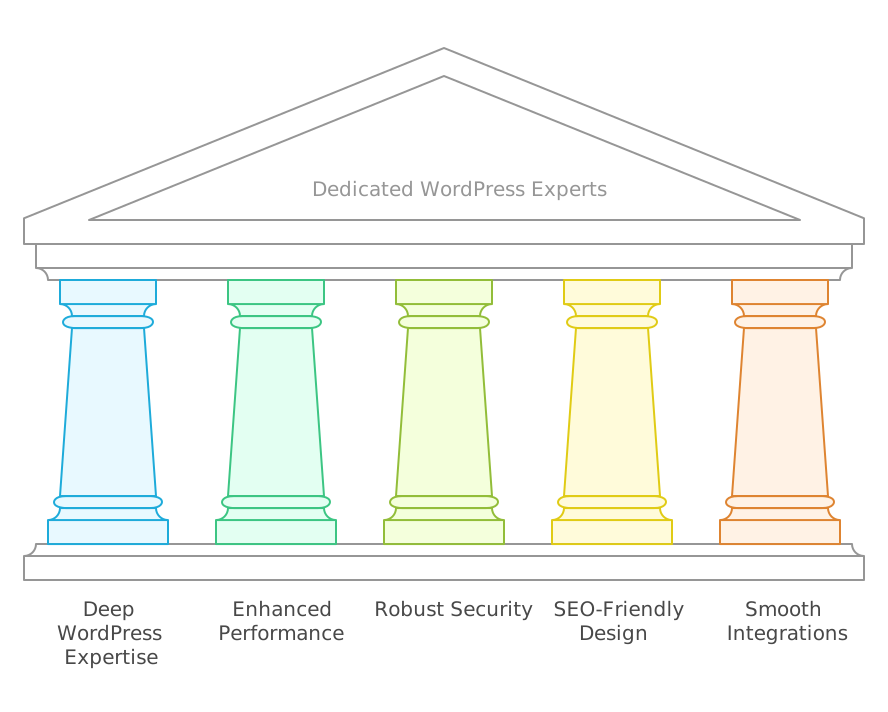
Deep WordPress Expertise
They master themes, plugins, and custom coding techniques to craft a site tailored perfectly to your needs.
Enhanced Performance
Experts ensure your site operates at optimal speed, avoiding the dreaded 3-second load time that makes 53% of visitors abandon a site.
Robust Security
With WordPress powering 43% of all websites, it’s a prime target for hackers. A specialized agency implements top-tier security measures to protect your site.
SEO-Friendly Design
They understand technical SEO, helping your site rank higher on Google for more organic visitors.
Smooth Integrations
Whether it’s WooCommerce, a membership system, or a custom booking platform, experts can integrate these features seamlessly.
Suggested reading:
12 Features of Good Web Design: Enhancing UX and SEO for Better Engagement
Redesigning Your WordPress Site: 10 Expert Tips for a Seamless Transformation
A redesign is your chance to refresh your brand, boost UX, improve speed, and climb in search results. Here’s a streamlined, ten‑step roadmap to ensure your WordPress makeover delivers real results.
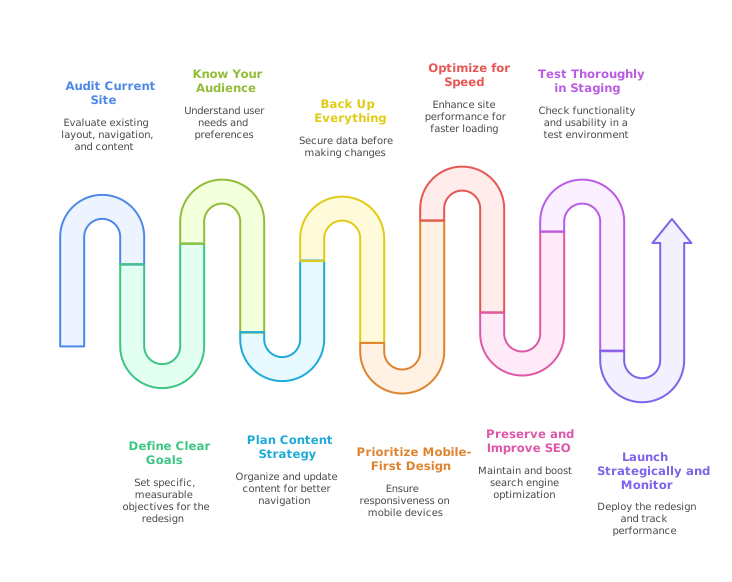
Audit Your Current Site
Perform a full “spring clean”: review layout, navigation, and content. Use Google PageSpeed Insights, GTmetrix or Pingdom to spot performance issues, and test mobile responsiveness. Dive into Analytics to identify top pages, traffic sources, and error hotspots. This audit sets your priorities and prevents old problems from resurfacing.
Define Clear Goals
Set SMART objectives—e.g., “Increase form submissions by 25% in 3 months” or “Cut mobile bounce rate below 40%.” Align every design and functionality choice with these goals.
Know Your Audience
Build simple personas (role, pain points, devices used). Run quick surveys or polls to hear directly from users. Tailor layouts, copy tone, and calls‑to‑action to the people you want to convert.
Plan Your Content Strategy
Inventory existing content in a spreadsheet: mark what to keep, update, rewrite, or remove. Map out any new pages or blog posts needed. Organize menus and internal links for intuitive navigation.
Back Up Everything
Before touching a line of code, back up your database and files with a plugin like UpdraftPlus or BlogVault—and store copies offsite. This “safety net” lets you restore if anything goes awry.
Prioritize Mobile-First Design
Choose a responsive theme and test layouts on phones and tablets. Simplify menus, enlarge buttons, and optimize tap targets. Use Google’s Mobile-Friendly Test to confirm your site meets today’s standards.
Optimize for Speed
Select a lightweight theme and limit heavy plugins. Compress and serve images in next‑gen formats (WebP), enable caching (e.g., WP Rocket), implement a CDN, and defer non‑critical scripts. Faster pages mean happier visitors and better SEO.
Preserve (and Improve) SEO
Test Thoroughly in Staging
Deploy your redesign on a staging site. Test all links, forms, and features across major browsers and devices. Enlist colleagues or beta testers for fresh eyes; they often catch what you miss.
Launch Strategically and Monitor
Pick a low‑traffic time to go live. After launch, verify functionality, check for broken links, and ensure analytics and search‑console tags are intact. In the first week, monitor site speed, bounce rates, and user flows; address any glitches immediately.
Is Your Web Content Driving Engagement and Conversions?
Transform visitors into loyal customers with persuasive, on‑brand copy that speaks directly to your audience’s needs and pain points. From homepage storytelling and service‑page narratives to product descriptions and compelling case studies, our web content creation services blend clarity, SEO best practices, and conversion‑focused structure for measurable impact.
WordPress vs. Alternatives: Why WordPress Still Reigns Supreme (with the Right Approach!)
You might be wondering, with so many CMS options out there, is WordPress really the best choice for scalability in 2025?
The answer is a resounding YES, especially with the right strategies and partners!
WordPress remains the most widely used CMS, powering 43.5% of all websites globally. Its open-source nature, vast plugin ecosystem, custom design freedom, and huge global community support make it incredibly flexible. It allows for building anything from simple blogs to complex e-commerce platforms and enterprise-grade portals.
While platforms like Webflow offer a cloud-based infrastructure and built-in performance optimizations that simplify scalability without plugins, WordPress’s scalability, when not properly optimized, can face challenges. These include performance degradation under high traffic, complicated plugin dependencies, frequent need for technical optimizations, and security vulnerabilities.
However, this doesn’t mean WordPress isn’t scalable! It means that to unlock its full potential, you need to be intentional with your choices and partner with experts. With the right managed hosting, careful plugin selection, theme optimization, and a focus on clean coding and regular maintenance, WordPress can easily handle high volumes of traffic and transactions, making it extremely scalable. It offers unmatched flexibility, customization, and long-term value that few other platforms can match.
Ready to Supercharge Your WordPress Website?
Your website is your most powerful marketing tool, and it deserves to perform at its peak! By embracing custom design, understanding scalability, and implementing strategic redesign tips, you’re not just updating a website; you’re investing in a high-performing asset that will drive results, engage your audience, and propel your business forward.
WordPress continues to be the most trusted CMS in the world, ready for your next phase of growth. So, why wait? It’s time to unlock the full power of WordPress and build a website that truly stands out!
Get started now – your future-proof website awaits!
Create scalable, high-performing, user-centric websites that support long-term business growth and deliver real ROI—start building smarter today.
Frequently Asked Questions
What makes a WordPress website high-performing?
A high-performing WordPress website loads quickly, is mobile-responsive, secure, and optimized for search engines. It delivers a seamless user experience and supports your business goals.
How can I make my WordPress site scalable for future growth?
Scalability in WordPress comes from choosing flexible themes, using quality hosting, optimizing databases, and selecting plugins that support increased traffic and functionality.
Why is user-centric design important in WordPress web design?
User-centric design ensures your site meets visitor expectations, improves engagement, and drives conversions by focusing on usability, accessibility, and intuitive navigation.
What are the best practices for WordPress web design in 2025?
Best practices include mobile-first design, fast loading times, SEO optimization, minimalistic layouts, and clear CTAs—all tailored to your target audience’s behaviour.
Is WordPress a good choice for large or growing businesses?
Yes, WordPress can power highly scalable websites for large or growing businesses when built with the right infrastructure, design strategy, and performance tools.